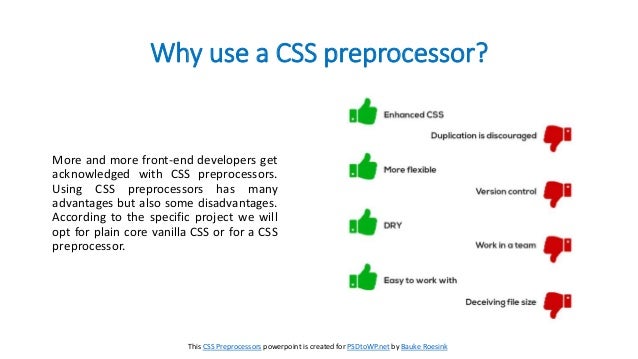
CSS preprocessors are transforming the front-end development landscape, offering a powerful way to streamline styling and enhance developer productivity. They provide a significant boost in terms of efficiency and code maintainability, making them a critical tool for modern web development. Essentially, a CSS preprocessor is a tool that extends the capabilities of CSS by allowing you to write more structured, maintainable, and reusable stylesheets. This approach addresses the challenges associated with complex front-end styling projects by enabling developers to write cleaner, more manageable code. This article explores the transformative power of CSS preprocessors, focusing on Sass and Less, to empower you to craft efficient and maintainable front-end styles. We’ll cover their advantages, common use cases, and practical examples to illustrate their impact on your workflow. Furthermore, the article delves into the specifics of using Sass and Less, highlighting their unique features and how they can be utilized in different front-end projects. We’ll explore common use cases, delve into the advantages and discuss potential downsides.
Understanding CSS Preprocessors
What are CSS Preprocessors?
CSS preprocessors are tools that extend the capabilities of standard Cascading Style Sheets (CSS). They allow you to write stylesheets with features like variables, nested rules, mixins, and functions, which are not directly supported by CSS. These features can lead to significant improvements in code organization, maintainability, and efficiency, particularly in large-scale projects. They essentially act as a layer above CSS, enabling you to write more expressive and organized styles. Using preprocessors can drastically reduce repetitive code and allow you to manage complex styles with greater clarity.
The Benefits of Utilizing CSS Preprocessors
Enhanced Code Maintainability
One of the major advantages of using CSS preprocessors is enhanced code maintainability. Preprocessors allow you to define variables, functions, and reusable styles, promoting a highly organized structure for your CSS. This clarity makes it easier for developers (or yourself!) to understand and modify styles, minimizing errors and speeding up the development process. The organized structure enables better comprehension of different style rules in the context of the entire style sheet. For large projects, this is crucial in avoiding unexpected style clashes and maintaining code quality.
Improved Styling Efficiency
Preprocessors provide streamlined workflows for creating, managing, and updating front-end styles. Variables provide consistent use of values, like colors and fonts, across a stylesheet. Functions enable creating reusable code for common tasks, while mixins reduce repetitive styles. This reduction in repetitive tasks saves time and effort compared to writing equivalent stylesheets manually in pure CSS, making the process much more streamlined.
Sass and Less: Popular Preprocessors
Sass: The Powerful and Extensible Choice
Sass, a syntactically rich preprocessor, provides an excellent solution for complex web projects. Its extension features empower developers to add custom functionalities or extend Sass with its robust libraries and extensions. It allows more flexible, expressive, and organized styles. Sass’s syntax also plays an important role by enhancing readability, especially in large projects, enabling effortless modification of styles.
Less: A Lighter, More Accessible Alternative
Less, a more accessible and simpler alternative to Sass, boasts similar features. It offers a more straightforward syntax, allowing developers to quickly write and understand its stylesheets. It’s a great entry point for those new to preprocessors or those seeking a lighter solution. Less often sees adoption for projects with a simpler CSS layout and a team with less extensive experience with CSS preprocessors.
Practical Applications and Examples
Styling Consistency and Reusability
Using preprocessors like Sass or Less allows for consistent application of styles throughout a project, making updates significantly faster and simpler. The use of variables and mixins also significantly enhances reusability, reducing redundant code and maintaining visual uniformity. This consistency ensures a cohesive visual experience across the entire website, enhancing user experience.
Dynamic Styling and Variables
Using CSS preprocessors, you can utilize variables to create a central repository for color palettes, fonts, and other styling properties. This centralized approach greatly simplifies changes across the entire project, allowing for rapid updates in styling and consistent look and feel, improving project maintainability.
Complex Layouts and Responsive Design
Preprocessors can be beneficial in creating responsive design layouts and complex projects. This includes employing nested rules to structure styles according to design requirements.
Related Post : Improving Website Performance: Optimizing Front-End Code for Speed.
Choosing the Right Preprocessor
Factors to Consider
When selecting a preprocessor, consider factors such as project size, team expertise, and project requirements. For complex projects with extensive design requirements, Sass’s advanced features might be preferable. Less might be more appropriate for smaller projects or projects with less extensive CSS features. The preprocessor should be an asset, not a burden, in terms of time and effort. Ultimately, choose the preprocessor that best aligns with your team’s proficiency level and project scope.
Integrating Preprocessors into Your Workflow
Setting Up Your Environment
Integrating CSS preprocessors often involves setting up the necessary tools and libraries. This includes installing the preprocessor compiler or runtime, ensuring compatibility with your build tools (e.g., Webpack or Gulp), and adapting your project structure. A well-defined setup is essential for efficient workflows.
Compiling Preprocessed Styles
After writing the stylesheet in your chosen preprocessor language, you’ll need to compile it into standard CSS. The compiler will handle this process, translating your preprocessor code into regular CSS that your web browser can understand. This process is seamless when properly integrated into your workflow.
Common Use Cases
Dynamic Styling
Preprocessors are incredibly helpful for creating dynamic styling scenarios, especially when dealing with complex projects. This capability facilitates the tailoring of styles to specific use cases. These features assist in customizing elements with differing styles based on various criteria, providing a more robust and streamlined process for applying styles.
Efficient Styling Maintainability
Using CSS preprocessors promotes efficient styling maintainability. By using variables, nested rules, and mixins, preprocessors enhance the ability to manage CSS efficiently. This organized system helps reduce conflicts and discrepancies that frequently arise in larger projects, making updates and modifications quicker and easier to implement.
Robust Development Workflow
Integrating preprocessors into your development workflow creates more manageable and efficient processes, ultimately streamlining the overall development experience.
Conclusion (Expanded):
Preprocessors are vital for projects requiring consistent styling across a larger design and efficient workflows. They improve the code maintainability, enabling greater organization, predictability, and readability for projects of any scale. By implementing preprocessors, developers can significantly boost productivity, especially on complex projects. Preprocessors are a fundamental tool in any web development toolbox, empowering developers to deliver efficient and highly maintainable front-end designs.
Potential Limitations
Learning Curve
There’s a learning curve associated with mastering any new tool, including CSS preprocessors. Thorough understanding is crucial to leverage the full potential of Sass or Less. However, the benefits usually outweigh the initial investment of time in learning the syntax and features of the tool.
Additional Tooling
CSS preprocessors typically require additional tools for compilation, leading to an expanded toolset. However, this is often manageable and even leads to improved workflow efficiency compared to manual CSS management.
Browser Compatibility
Browser compatibility is a concern when using preprocessors. Ensure that the preprocessed CSS remains compatible across different browsers to avoid compatibility issues or errors. Preprocessors must be used with caution in this regard, ensuring compatibility and code quality in all browsers. This aspect necessitates diligence and consideration in the development process to ensure quality, maintainability, and a smooth user experience across different browsers and devices. Checking compatibility across all targeted browsers and devices is critical for a high-quality user experience and a reliable website structure overall. These concerns should not dissuade adoption of CSS preprocessors; proper consideration mitigates potential browser compatibility issues during the development process. Extensive testing should be conducted and validation procedures implemented throughout the development process to catch any incompatibility issues early. Understanding these implications allows you to leverage the benefits of CSS preprocessors effectively while addressing potential compatibility concerns adequately in the development process, enabling a seamless and effective user experience across all targeted browsers and devices.
In conclusion, harnessing the power of CSS preprocessors is essential for streamlining front-end styling and boosting developer productivity. By adopting a preprocessor like Sass or Less, you can significantly enhance code maintainability, reduce repetitive tasks, and create scalable and robust styling solutions. Embrace the power of preprocessors to elevate your front-end development workflow. Dive deeper into preprocessor mastery by exploring the available tutorials and resources. This will undoubtedly propel your skills to new heights and contribute to high-quality projects.


