Enhancing user interaction is paramount in modern web development. A captivating user experience is no longer a luxury but a necessity, especially in a competitive digital landscape. A well-designed user interface (UI), powered by robust JavaScript frameworks and libraries, is fundamental for creating applications that not only function effectively but also engage users on a deeper level. This article explores various approaches to optimizing user experience using JavaScript frameworks and libraries, highlighting common pitfalls and offering practical solutions. By mastering these techniques, developers can create dynamic applications that respond intuitively to user actions and create a positive interaction. This article will cover selecting the appropriate framework, optimizing performance, considering accessibility, and designing user-friendly interfaces, providing a practical guide for enhancing user interaction with JavaScript frameworks.
Choosing the Right JavaScript Framework
Understanding the Ecosystem
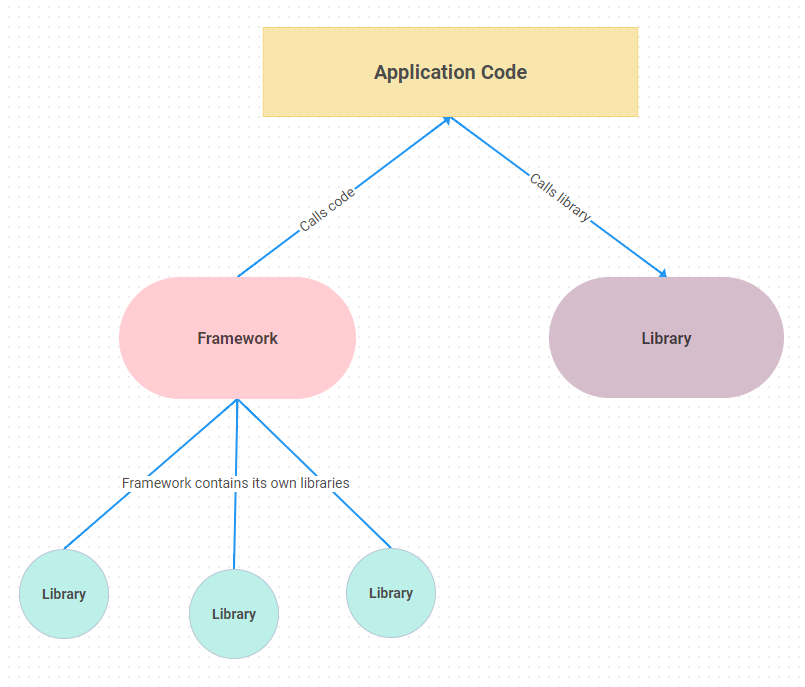
Selecting the right JavaScript framework or library is a crucial first step in building a high-performance and user-friendly application. The JavaScript ecosystem offers a wide array of tools, each with unique strengths and weaknesses. Factors such as the size of your team, project scope, and your team’s existing familiarity with the framework should guide your choice. A significant part of successful user interaction is choosing a framework that aligns with your project’s specific needs.
Comparing Popular Frameworks
React, Angular, and Vue.js are popular choices, each with its own approach to handling user interaction. React, known for its component-based structure, allows for efficient management of user interface changes. Angular, on the other hand, offers a more structured and opinionated approach, which can be ideal for larger projects. Vue.js provides a more lightweight solution, making it a strong contender for smaller projects. Understanding the intricacies of each framework is vital, as each one offers diverse options in the way user interaction is handled. Considering the experience of your team and the size of the project are crucial for optimal user experience.
Evaluating the Framework’s API
Thorough examination of the API and supporting documentation is essential in assessing whether a framework effectively supports seamless user interaction. Developers need to understand the framework’s tools for handling user input, animation, and state management. The framework’s ability to integrate smoothly with other parts of the application is also essential. Careful consideration of the API, alongside its documentation, helps determine how well the framework supports seamless user interaction.
Related Post : Improving Website Performance: Optimizing Front-End Code for Speed.
Optimizing Performance for a Smooth User Experience
Handling User Input Efficiently
Efficient handling of user input is vital for responsiveness. Strategies such as debouncing and throttling, techniques to prevent overloading the system, can significantly improve performance, even for complex interactions. These techniques ensure smooth and responsive interactions, crucial for positive user experience.
Performance Considerations
Consideration of performance at the design stage, rather than an afterthought, often significantly enhances the user experience. Optimize images and other assets, and use a Content Delivery Network (CDN) to ensure quick loading speeds. Code splitting techniques can also minimize the initial load time for the application, improving user interaction.
Accessibility for Inclusivity
Ensuring Accessibility for All Users
Building accessible applications is essential to cater to a diverse range of users, including those with disabilities. Consider features like keyboard navigation and screen reader compatibility to improve accessibility, promoting a positive user interaction for all users. Implementing features for screen readers and keyboard navigation provides user experience for users with disabilities.
Implementing Inclusive Design Principles
Implementing inclusive design principles is crucial to ensure that your application is accessible to users with various abilities and needs. This involves careful consideration of colour contrast, font sizes, and clear labeling. User testing can help identify areas for improvement in the design.
Keyboard Navigation and Screen Reader Support
Prioritizing keyboard navigation and supporting screen readers is vital. This means ensuring all interactive elements are accessible using only a keyboard and that screen reader users can interact with the application without issues. Ensuring these crucial features are integrated leads to a positive and accessible user experience.
Designing User-Friendly Interfaces
Providing Clear and Concise Feedback
Clear and concise feedback to user actions is crucial for seamless interaction. Use visual cues and notifications to inform users about the state of their interaction. Providing feedback through visual cues and notifications enhances a positive user experience.
Visual Hierarchy and Navigation
Effective visual hierarchy and intuitive navigation are essential for positive user interaction. A well-structured interface ensures users can easily find what they need. Intuitive navigation allows users to find information and complete tasks easily.
Testing and Iteration
Thorough user testing and iterations are key steps in enhancing user interaction. Collect user feedback and refine the design and functionality to improve user satisfaction. Conducting usability testing allows for evaluation and enhancement of user experience.
Advanced Techniques for Optimization
State Management Solutions
Leveraging state management solutions such as Redux or MobX can significantly improve the efficiency and maintainability of complex applications. These frameworks enhance data flow and predictability, enabling developers to create more sophisticated user interaction patterns. These solutions often improve application’s overall maintainability and efficiency.
Code Splitting and Lazy Loading
Implementing techniques like code splitting and lazy loading can improve initial load times, enhancing the immediate experience for users. These techniques load resources only when needed, which results in faster initial application loading times, improving the user experience.
Utilizing Performance Profiling Tools
Performance profiling tools allow developers to identify and address bottlenecks that might negatively impact user experience. Profiling tools enable optimization and better user interaction.
null
null
null
null
In conclusion, enhancing user interaction with JavaScript frameworks and libraries is crucial for creating engaging and responsive web applications. By leveraging the capabilities of these tools, developers can create dynamic user interfaces that meet user needs and exceed expectations. We’ve explored various aspects, from selecting the right framework to optimizing performance. Choosing the right toolset tailored to your project needs is key to successful user interaction. Explore the options available, implement best practices, and continue learning to ensure your applications are not only functional but also delightful for users. To delve deeper into specific frameworks, resources like the official documentation for each framework will be invaluable. Consider attending workshops, webinars, and conferences to stay abreast of the latest developments and best practices. Learn more and start enhancing your user interaction today!


