Collaborating effectively as a UI/UX design team is paramount for creating exceptional user experiences. A harmonious design process not only speeds up the development cycle but also ensures that the final product reflects a unified vision. A collaborative team environment allows for a wider range of perspectives, generating innovative solutions and fostering a strong sense of shared ownership. However, many teams struggle with different communication styles, conflicting priorities, and a lack of streamlined workflows. This article delves into the critical strategies and tools for teams to collaborate seamlessly, fostering creativity, optimizing workflow, and ensuring a high-quality design output. We’ll explore communication best practices, effective use of design tools, and strategies for constructive feedback. Ready to transform your team’s collaboration?
Establishing Clear Communication Channels
Defining Roles and Responsibilities
Establishing clear roles and responsibilities for each team member is crucial for effective collaboration. Each member should understand their specific contributions, deadlines, and the overall project goals. This clarity helps avoid overlaps and ensures everyone is working towards a common vision. A well-defined structure ensures everyone knows what to expect from each other. For example, assigning a dedicated project manager or lead designer can streamline tasks and communication flow.
Utilizing Effective Communication Tools
In today’s digital landscape, leveraging appropriate communication tools is vital for a productive team. Platforms like Slack, Microsoft Teams, or dedicated design platforms like Figma can significantly enhance communication. Using these tools for quick questions, brainstorming sessions, design feedback, and sharing documents can facilitate seamless knowledge sharing. Encourage consistent use of these channels to avoid information silos and enable quick response times.
Establishing Regular Check-ins
Scheduling regular check-ins, whether daily stand-ups or weekly project reviews, is an excellent way to keep everyone on the same page. These brief meetings allow for quick updates on progress, identification of roadblocks, and collaborative problem-solving. Team members can use this opportunity to highlight any challenges they face, enabling immediate support and proactive solutions.
Related Post : Error Handling in UI/UX: Guiding Users Through Mistakes.
Fostering a Culture of Open Communication
Cultivate an environment where team members feel comfortable sharing ideas, feedback, and concerns. Encouraging open discussions and constructive criticism fosters a culture of trust and collaboration, allowing for a more collaborative design environment. Make sure every member feels empowered to voice their opinions and concerns without fear of judgment or retribution.
Leveraging Collaborative Design Tools
Mastering Collaborative Design Platforms
Platforms like Figma, Adobe XD, and Sketch have become indispensable for collaborative design work. These tools allow multiple designers to work simultaneously on the same project, facilitating real-time feedback and revisions. Visualizing design progress in real-time minimizes confusion and streamlines the design process. Real-time design updates and collaboration improve coordination and communication in design work.
Implementing Design Systems
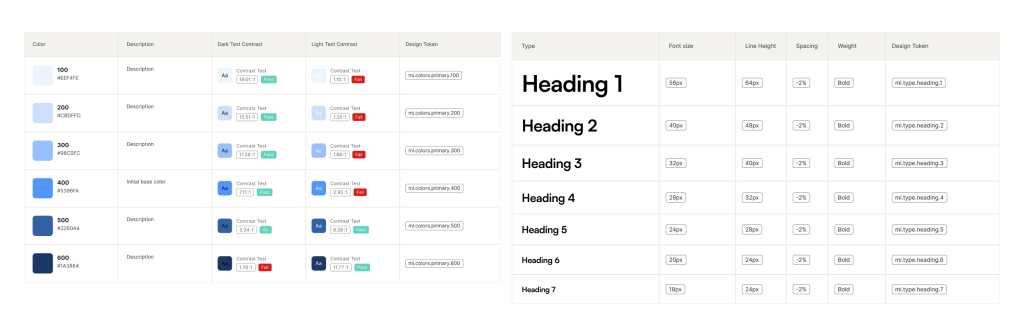
A well-defined design system plays a crucial role in maintaining consistency across a project. A unified design system establishes standards and guidelines that all team members adhere to. This ensures a unified aesthetic and user experience. Using a shared style guide or design principles document maintains brand consistency and promotes effective collaboration.
Utilizing Version Control and Comments
Utilizing version control systems within your collaborative design tools ensures that everyone is working with the most up-to-date design files. Features like comments and annotations allow for easy feedback and revisions, enhancing collaboration while preserving a clear design history. The integration of version control improves the quality of the final product and promotes accountability among design team members.
Streamlining Feedback Loops
Implementing a well-defined feedback loop fosters a collaborative environment and promotes continuous improvement. Establish clear channels and deadlines for providing and responding to feedback, ensuring constructive criticism is integrated without delays. Encourage designers to provide feedback promptly and constructively, creating an iterative design process.
Fostering a Positive Team Dynamic
Cultivating a Culture of Respect and Collaboration
Creating a collaborative work environment necessitates respect and mutual support among team members. Acknowledge each team member’s contributions to encourage a sense of belonging and recognition. Teammates need to value diverse perspectives to create a more inclusive work environment. This supportive atmosphere enables open discussions, constructive criticism, and collaborative problem-solving.
Encouraging Active Listening and Empathy
Effective collaboration relies heavily on active listening and empathy. Encouraging team members to listen actively to each other’s ideas, understand differing viewpoints, and consider the impact of their work on others, creates a shared understanding. Encourage empathy in understanding different perspectives, fostering a more understanding and cooperative working environment.
Recognizing and Celebrating Successes
Recognizing and celebrating team successes, whether big or small, boosts morale and fosters a sense of accomplishment and encourages unity in achieving common goals. Regular team recognition or celebrations, whether formal or informal, can reinforce positive behaviors and motivate continued collaboration.
Building Trust and Open Communication
Building trust and open communication are cornerstones of any successful team. Establish clear communication channels for sharing ideas, providing feedback, and resolving conflicts. Create a safe environment where members feel comfortable sharing concerns, encouraging a healthy collaboration and promoting a more productive design environment.
Addressing Potential Challenges
Navigating Design Conflicts
Design conflicts are inevitable in any collaborative environment. Establishing clear guidelines and a structured conflict resolution process is essential. These guidelines and strategies enable effective resolution in a less confrontational manner. Provide clear parameters and guidelines for design decisions to minimize conflicts.
Managing Time Constraints and Deadlines
Managing time constraints and project deadlines is crucial for effective UI/UX design collaboration. Utilize project management tools to visualize tasks, assign responsibilities, and track progress, enabling timely completion of project goals.
Maintaining Design Consistency
Maintaining design consistency throughout a project is essential. Establish style guides, design patterns, and brand guidelines to ensure a unified user experience, fostering trust and collaboration.
Encouraging Constructive Feedback
Provide guidelines to encourage constructive feedback within your team. Emphasize the importance of clear, focused feedback, and create a supportive atmosphere where feedback is viewed as a tool for improvement. Address conflicting feedback or approaches in a calm and constructive manner to avoid derailment.
Measuring and Improving Collaboration
Tracking Key Performance Indicators
Track key performance indicators (KPIs) related to collaboration, such as project completion rates, feedback response times, and the number of design revisions. This data provides insights into what works well and where improvements are needed.
Conducting Regular Team Assessments
Regularly assess your team’s collaboration practices and gather feedback from team members. These assessments identify areas for improvement, fostering a collaborative working environment.
Implementing Continuous Improvement Cycles
Implement continuous improvement cycles to address areas for improvement in team collaboration, creating more effective design cycles.
Encourage Feedback and Iteration
Encourage feedback and iteration in the design process. This fosters a collaborative environment that values input and promotes improvements in design work.
In conclusion, effectively collaborating as a UI/UX design team hinges on strong communication, shared understanding, and a commitment to the project’s goals. By embracing clear workflows, utilizing collaborative tools, and fostering a culture of constructive feedback, teams can overcome challenges, optimize processes, and ultimately deliver high-quality, user-centered designs. If you’re looking to elevate your design team’s collaboration strategies, the steps outlined in this article can be a valuable resource for you. Now, go forth and design!