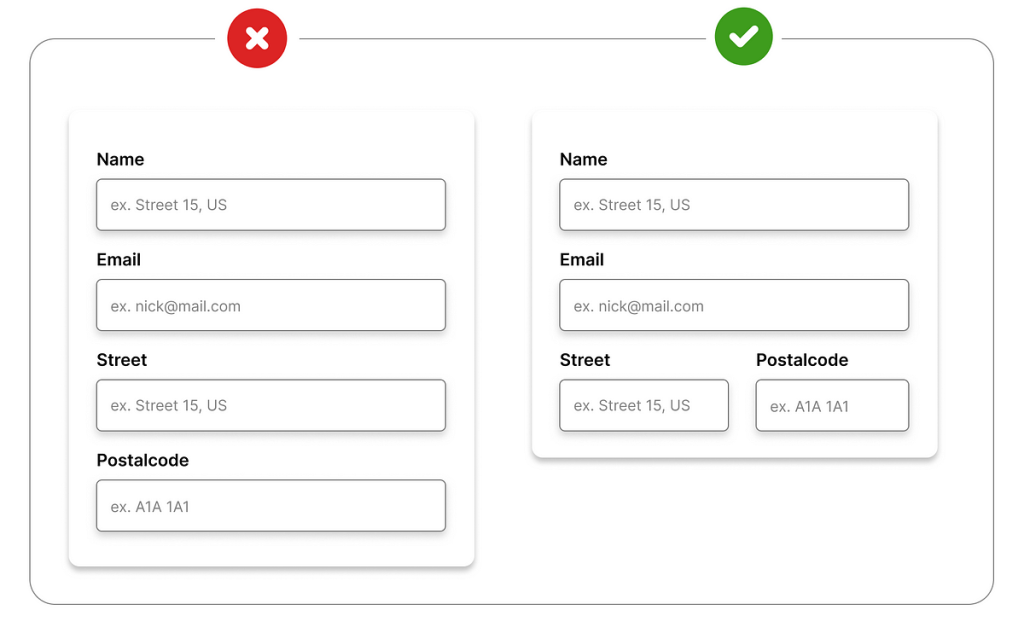
Designing effective forms is paramount for a seamless user experience and high conversion rates. Imagine a website with confusing forms that frustrate users and deter them from completing transactions—it’s a recipe for lost opportunities. This guide dives deep into the principles of creating forms that are not just functional but also intuitive and engaging for your audience. We’ll explore how to incorporate design principles, user feedback, and accessibility considerations. This article will provide a comprehensive framework, covering everything from the fundamental design elements to advanced strategies for optimizing user interaction. By the end, you’ll have a clear blueprint for crafting effective forms that yield remarkable results.
Understanding the Importance of User-Centric Form Design
Defining Form Design Principles
Form design is more than just arranging fields on a page. It’s a critical component of user experience (UX) and plays a pivotal role in driving conversions and fostering positive user interactions. Understanding user needs and pain points is essential to designing forms that are effective. A user-centric approach to form design prioritizes the user’s perspective throughout the process. This includes considering their cognitive load, expectations, and overall interaction with the form. For example, a complex form might overwhelm the user leading them to abandoning the form or even the entire website. A well-designed form, on the other hand, provides a seamless and intuitive experience, guiding users through the process with ease.
User Journey Mapping
A good strategy is mapping out the user’s journey through the form. Identifying potential pain points and obstacles along the way allows developers to make adjustments and improvements in the form, leading to a streamlined experience. Consider what information the user needs to complete the task. Does it make sense to ask for too much or too little information? A clear understanding of the data needed and how it will be used reduces uncertainty and improves the user experience. For instance, if you are collecting payment information, ensure that the security of their data is clearly conveyed. Using security symbols, secure payment gateways, and clear language about data security policies will increase user confidence.
Optimizing Form Structure for Enhanced Clarity
Designing Logical Form Flow
Designing a logical and user-friendly form flow is crucial. Think about the steps a user needs to take to complete the form. Place the most crucial questions at the beginning to quickly filter out unsuitable leads or customers. Divide the form into logical sections grouped by category. Use clear labels and concise instructions for each field. For example, if the form is collecting personal information, the flow should be structured in a logical and straightforward manner. Start with the essential questions and move towards additional data.
Minimizing Cognitive Load
Keep forms concise and avoid overwhelming the user with excessive questions. Use clear and concise language, and ensure that every field is labeled appropriately. A well-structured layout with visual cues enhances clarity and reduces the cognitive load for users. For example, using a progress bar visually cues the user of their advancement through the form and shows the remaining steps, which greatly contributes to a user-friendly experience. This design will help your users complete the form without stress.
Related Post : Understanding the Core Principles of Effective UI/UX Design.
Enhancing Form Aesthetics for Improved User Interaction
Applying Visual Design Principles
Visually appealing forms improve engagement and reduce user frustration. Use a consistent color scheme that is easy on the eyes. Employ clear typography, suitable for readability across different devices. Consider using visual hierarchy to highlight important fields and guiding elements, making the form layout intuitive to follow. The proper use of white space contributes greatly to the aesthetics of your form, ensuring elements are organized in a manner that is visually easy to process, thus providing a more aesthetically pleasing user experience. Using visuals, like icons, will also improve the overall user experience.
Employing Visual Cues
Use visual cues such as progress bars or icons to inform users about their form completion status and the steps involved. For example, a progress bar indicates how far a user is along the process, providing a sense of accomplishment and progress. This type of design aids greatly in the user’s understanding of the form flow and makes it less overwhelming.
Integrating Accessibility Features for Enhanced Inclusivity
Ensuring Compliance with Accessibility Standards
Accessibility is a crucial aspect of form design, ensuring that forms are usable by everyone, regardless of their abilities. Comply with accessibility guidelines to ensure forms are usable by users with disabilities, such as those using screen readers or assistive technologies. Providing alternative text for images and using clear, concise labeling for each form field greatly contributes to the overall inclusivity of the form. Utilizing appropriate keyboard navigation is another critical component to create a seamless user experience for those using assistive technologies. Using descriptive labels for all form elements, providing captions for all visual media, and following appropriate color contrast ratios are essential components of designing an accessible form.
Implementing Accessible Design Elements
Use sufficient color contrast to provide easy readability for users with visual impairments. Provide alternative text descriptions for images and use clear, concise labels for form elements. These elements assist screen reader users and are vital for compliance with accessibility standards. For example, the ability to skip fields without losing important information can improve the user experience and avoid any unnecessary complications, leading to a more user-friendly experience.
Testing and Iterating for Optimizing User Experience
Gathering User Feedback
Gathering feedback from users is essential for identifying pain points and areas for improvement in form design. Conduct user testing sessions to observe how users interact with the form, identifying areas of confusion or frustration. Surveys and questionnaires can further provide insights into user preferences and expectations. Gathering this information is crucial for creating a user-friendly experience.
Continuously Evaluating and Updating
Analyze user feedback and use this data to continuously refine and improve the form. Test different form layouts, wording, and elements to see how they impact user behavior. Utilize analytics and tracking tools to monitor form completion rates and identify areas for optimization. This approach allows you to continuously evaluate and update the form as needed. Regular adjustments based on user feedback and data analysis will lead to an even better user experience.
Case Studies of Successful Form Design
Analyze Examples of Effective Web Forms
Examining successful web forms can offer valuable insights and best practices. Review forms from reputable websites that have demonstrated success in collecting user information. Studying successful forms on major websites can inspire your own form designs, allowing you to learn from their effective strategies and implement similar or refined versions for your own form design.
Conclusion
Conclusion
Conclusion
In conclusion, designing effective forms is crucial for enhancing user interaction and achieving optimal results. By understanding user needs, utilizing accessible design principles, and prioritizing clear communication, businesses and developers can create forms that are not only aesthetically pleasing but also functional and user-friendly. This approach leads to improved conversion rates, higher user satisfaction, and ultimately, a more successful online experience. For further assistance in form design, consider consulting with a UX specialist or exploring online resources dedicated to effective form design. Remember, continuous testing and refinement are key to achieving optimal results.